Copilot forMicrosoft 365
Copilot for Microsoft 365 is a generative AI assistant built right into your favourite Microsoft apps. Imagine the possibilities once your Microsoft 365 environment is transformed into a true productivity powerhouse.
What is Copilot for Microsoft 365?
Imagine generating reports in Excel faster, crafting compelling emails in Outlook with just a few prompts, or even getting a head start on presentations in PowerPoint. Copilot for Microsoft 365 streamlines your workflow and unlocks features you never knew existed.
We are here to help you master Copilot for Microsoft 365, helping you to save time, maximise resources, and take your work to the next level. Streamline your workflow with automated tasks, translate documents on the fly, and leverage the power of artificial intelligence to master the Microsoft 365 suite.
Struggling with...
- Inefficient workflows? Spending too much time on repetitive tasks in Word, Excel, Outlook, and PowerPoint?
- Communication overload? Feeling swamped by emails and struggling to craft impactful messages quickly?
- Data analysis paralysis? Drowning in spreadsheets and unable to extract meaningful insights?
- Collaboration chaos? Losing track of information in endless Teams chats and file folders?
Copilot for Microsoft 365 helps to:
- Automate repetitive tasks: Let Copilot handle formatting, data entry, and other time-consuming chores, freeing you to focus on strategic work.
- Write with confidence: Generate clear, concise emails and documents with AI-powered suggestions and summaries.
- Unlock the power of your data: Use natural language to ask questions about your spreadsheets and gain valuable insights in seconds.
- Streamline teamwork: Surface relevant content from Teams chats and files, keep everyone on the same page, and automatically generate follow-up tasks from meetings.
Top Features of Copilot for Microsoft 365
Imagine a workday where emails flow effortlessly from your fingertips, impactful and clear. Presentations practically build themselves, bursting with data-driven insights. Complex tasks in spreadsheets become a breeze, leaving you with time to analyse and strategize.
Copilot for Microsoft 365 isn’t just another tool – it’s your secret weapon for unleashing your full potential at work. We’re talking about becoming a productivity powerhouse, someone who gets things done efficiently and leaves a lasting impression. Let’s explore the features that will help you achieve this – features designed to make you more efficient, productive, and ultimately, a key player in your team’s success.
Effortless Communication
Feeling overwhelmed by emails and communication tasks? You’re not alone. Juggling a busy schedule often leaves little time to perfect your written communication. But what if there was a way to write faster and with more impact? Enter Copilot. Its AI-powered features can be your secret weapon for effortless communication.
Conquer Complex Tasks with Copilot
Software like spreadsheets can be powerful but mastering them can be a challenge. Complex formulas, overwhelming data manipulation, and time-consuming formatting can slow you down. Copilot injects intelligence into your programs, saving you time and helping to get things done faster.
The Ultimate Organiser
Feeling like your calendar and inbox are constantly at war? Juggling meetings, deadlines, and tasks across various platforms can make staying organised a nightmare. Copilot becomes your intelligent personal assistant, pulling information from all corners and streamlining your day, meetings, tasks, and deadlines.
Copilot for Microsoft 365 in Numbers
Faster users, in a series of tasks (searching, writing, and summarising).
Users said Copilot for Security helped them improve the quality of their work.
Said Copilot reduced the effort needed to complete the task.
Said they want Copilot next time they do the same task.
Copilot for Microsoft 365 in Use
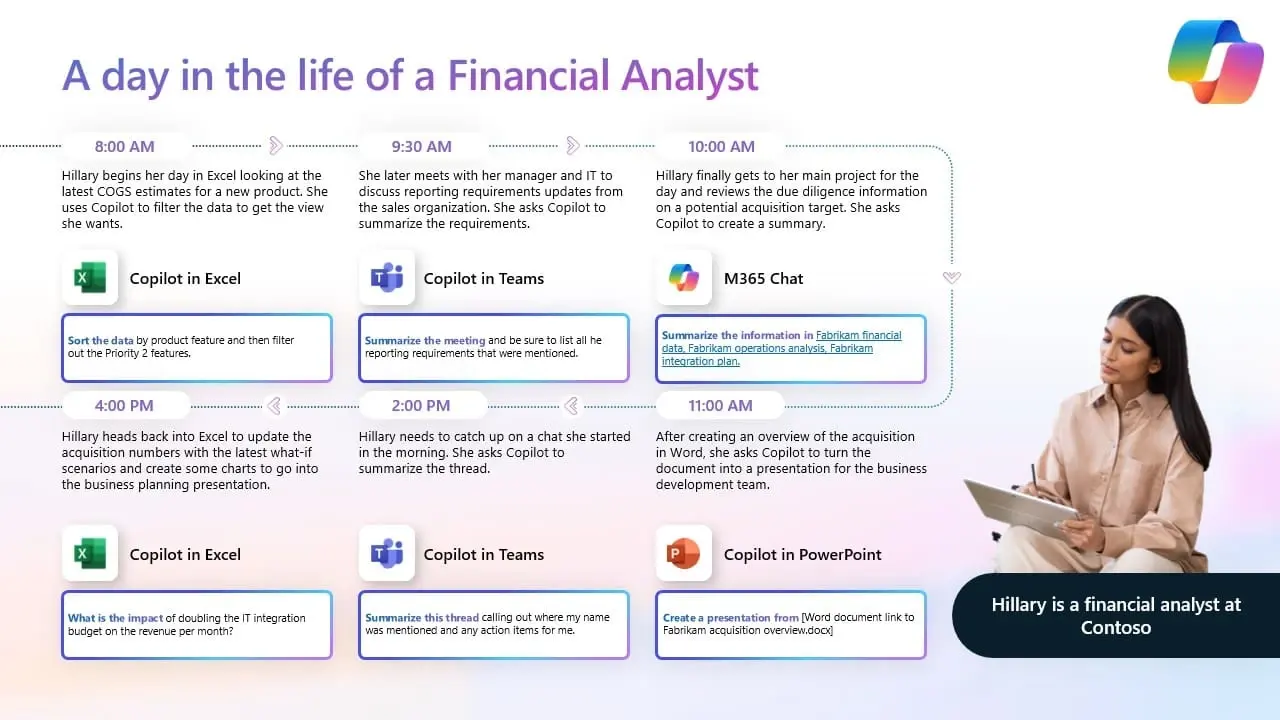
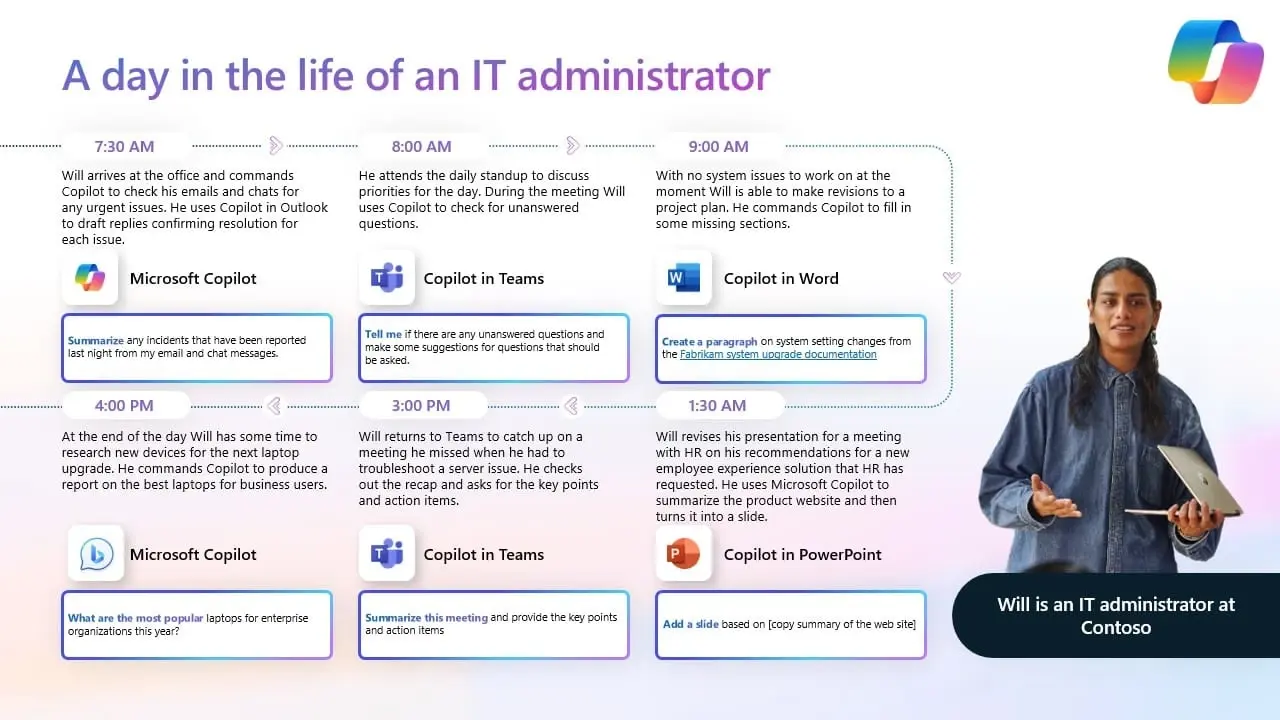
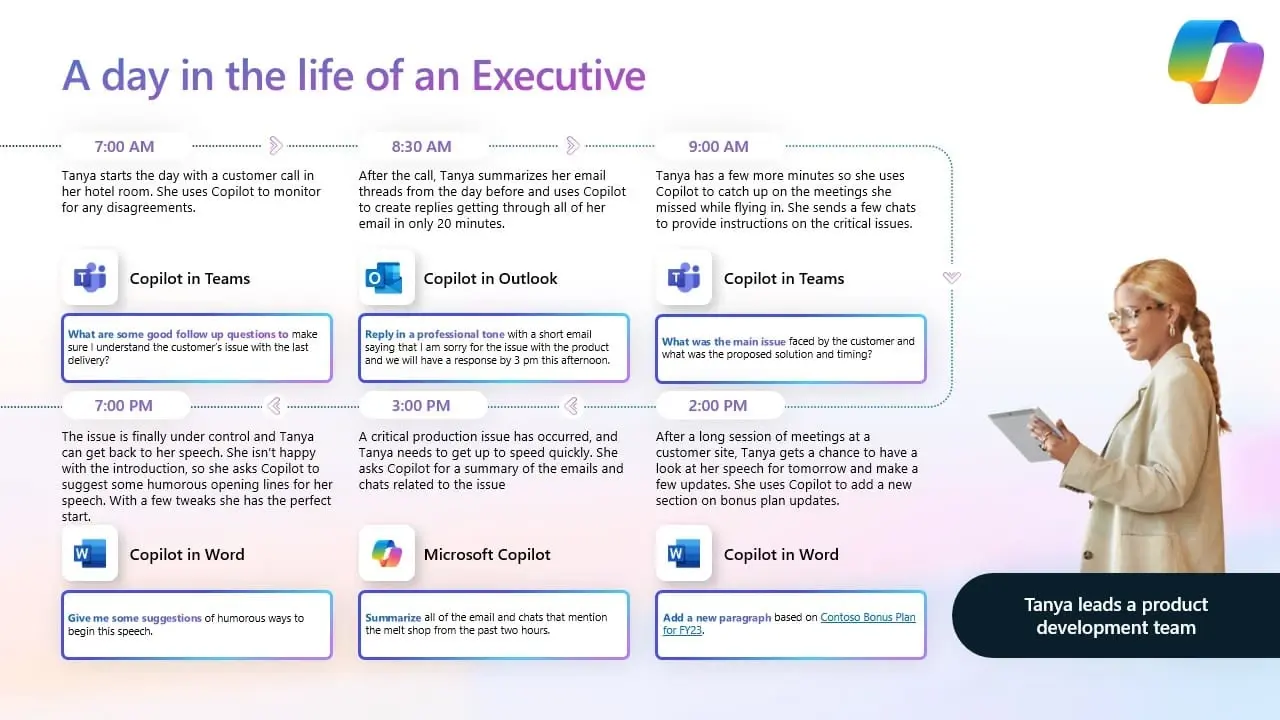
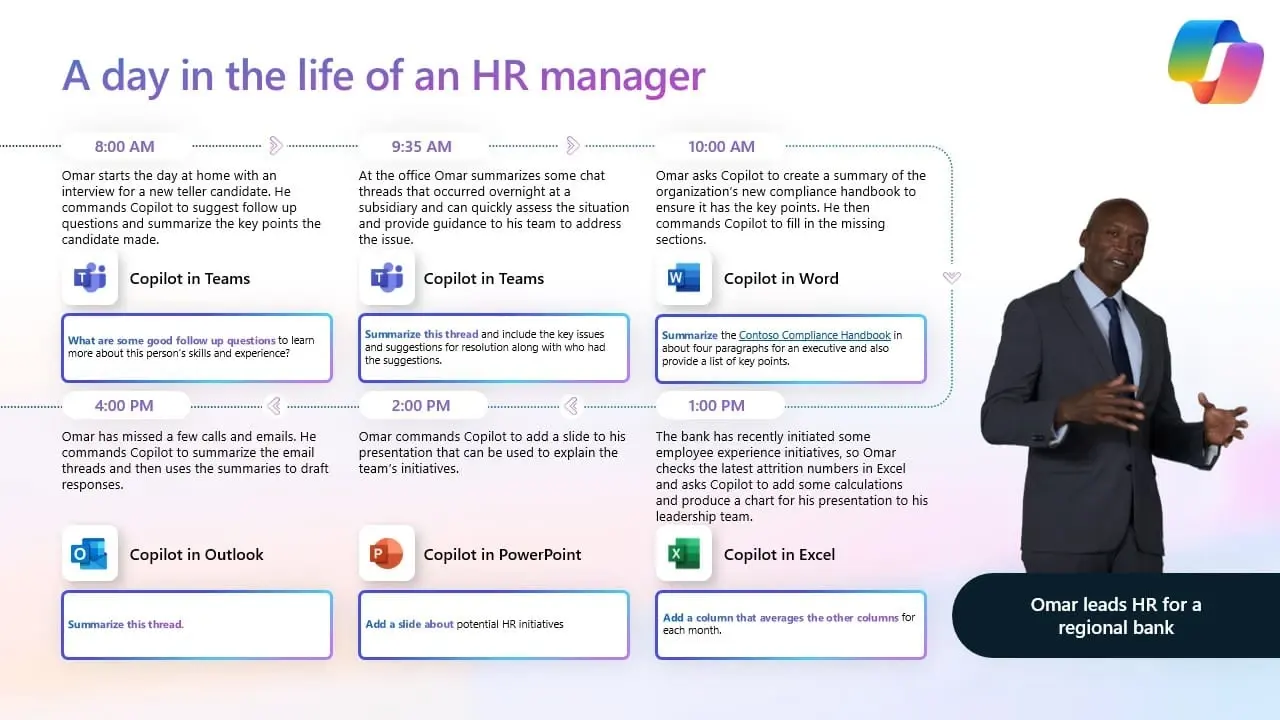
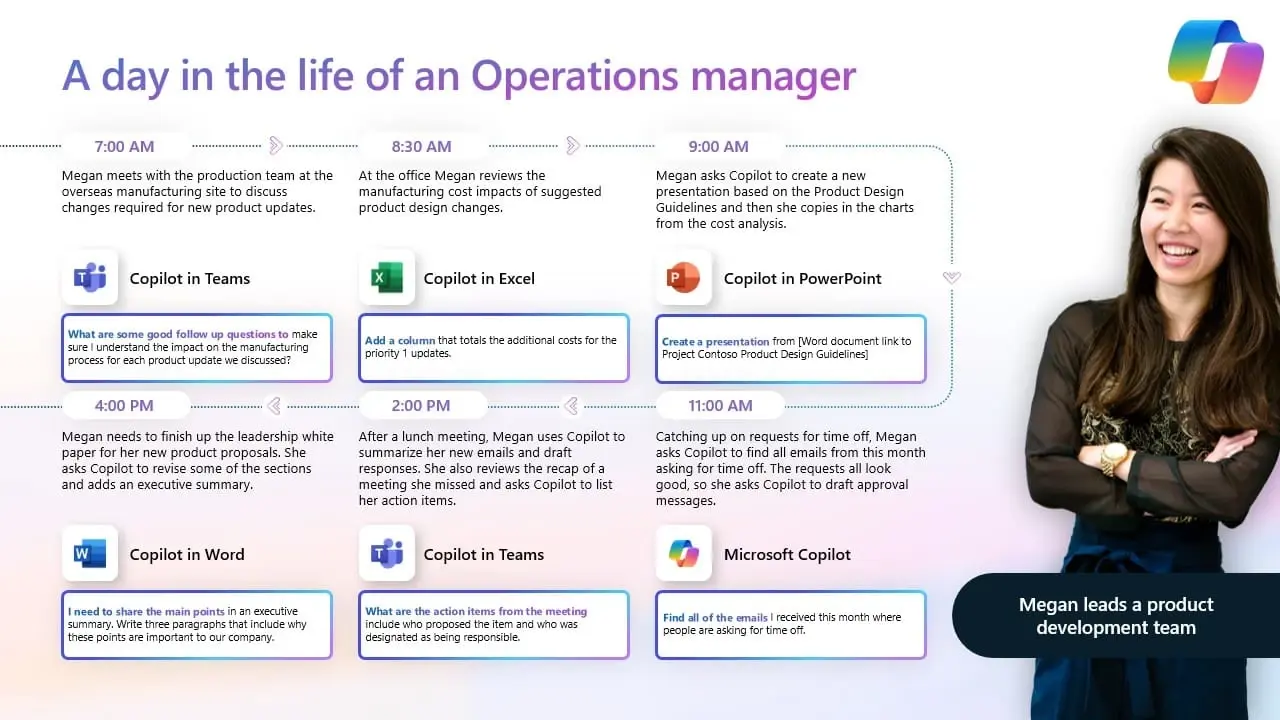
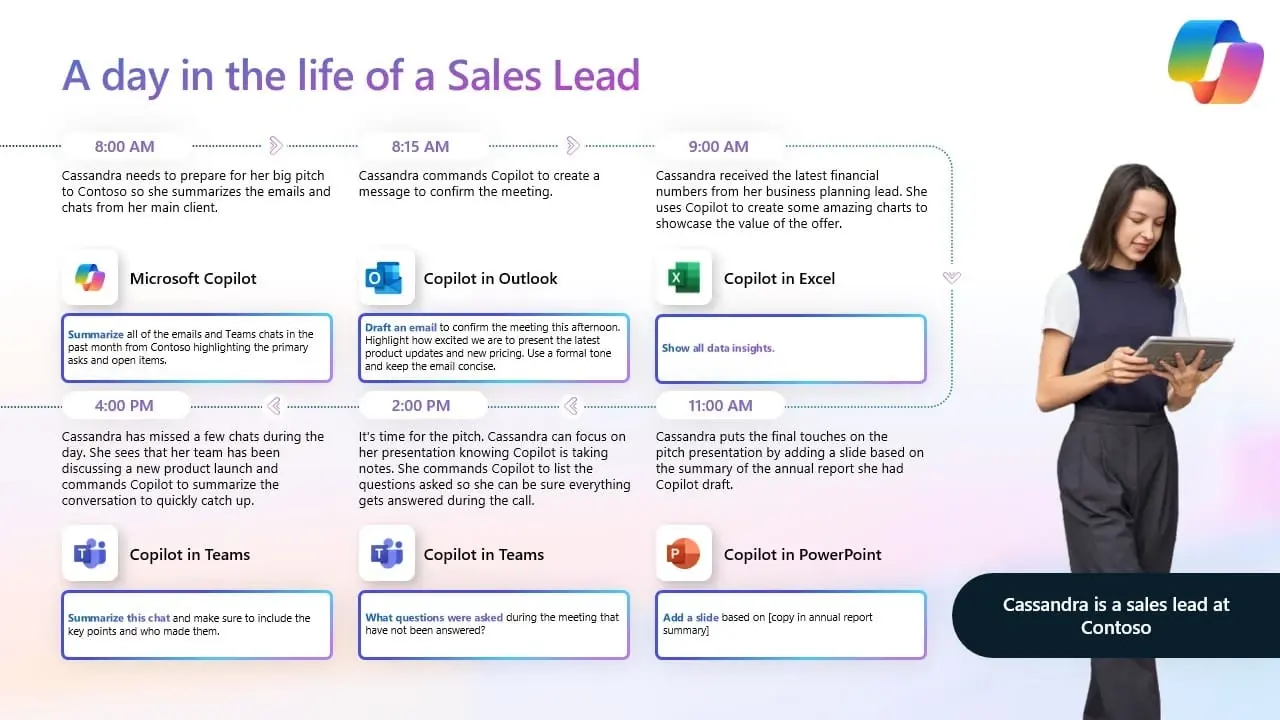
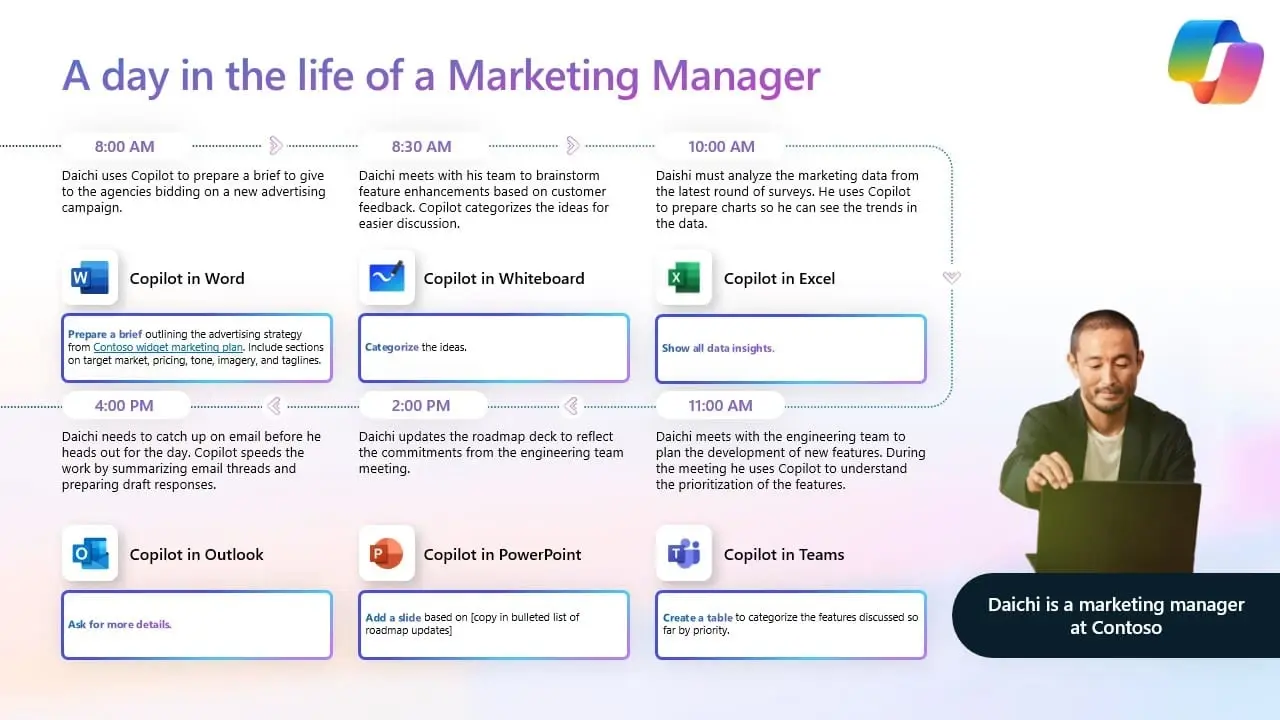
Copilot isn’t just for one person. It’s a powerful tool that can empower every member of your team, regardless of their role. See how Copilot for Microsoft 365 can transform the way your team works:
Click on an image to enlarge.
Effortless Cloud Migration & Setup
We seamlessly move your infrastructure, apps, and desktops to Azure for enhanced scalability, security, and cost savings.
Modern Work Made Easy
Expert Guidance Every Step
The MVP’s Introduction to Copilot for M365 Readiness
Copilot for Microsoft 365, the versatile AI companion, is knocking on your door. But are you truly ready to unlock its full potential?
In this introduction, we’ll help get you started by cutting through the hype and equipping you with winning strategies to help you master Generative AI, unlock Copilot for Microsoft 365, level up your teams’ productivity, and ensure a secure, compliant strategy.
Click through, download your free MVP Introduction to Copilot for M365 Readiness, and score big with AI in your SMB.
Meet the Innovators:
Uncover How IT Leaders Leverage Tech for Success
The IT landscape is constantly evolving, and at the forefront are inspiring individuals who are pushing boundaries and driving positive change within their organisations.
Here at Babble, we’re passionate about celebrating these IT heroes and sharing their insightful stories.
In this interview series, we delve into the world of these exceptional professionals. We’ll explore their journeys, the challenges they’ve tackled, and the innovative ways they’re leveraging technology to make a real impact.
Whether it’s streamlining workflows, boosting efficiency, or unlocking the full potential of their chosen platform, these interviews are packed with valuable insights and practical takeaways.
Securing Copilot Buy-In
Microsoft 365’s Copilot promises a productivity revolution, but securing buy-in from decision-makers requires a clear demonstration of its value.
Fast-track your Copilot implementation with our customisable Business Case Template. This free resource equips you to:
Quantify the benefits of Copilot, like increased efficiency and cost savings.
Align Copilot with your company goals for maximum impact.
Outline a clear implementation strategy that minimises disruption and maximises user adoption.
Secure approval easier by presenting a well-structured plan for a successful rollout.
How Copilot Transforms Your Microsoft Teams Experience
Tired of boring meetings, lost information in chats, and endless file folders? What if there was a way to transform your collaboration hub into a powerhouse of productivity?
Microsoft Teams just got a serious upgrade, packed with AI-powered tools that will transform your workday. Imagine meetings that are focused and productive, with AI summarising key points and automatically generating follow-up tasks.
Say goodbye to information overload – Copilot can surface relevant content from previous chats and files, ensuring everyone stays on the same page. Benefit from intelligent search to help you locate information instantly, saving you valuable time.
Take a look at some practical examples of Copilot for Microsoft 365 working in Teams with Rhys Williams, our Head of Product Marketing, and Peter Graham, Ingram Micro’s Partner Development Manager for Modern Work.
They will take you through the secrets of using AI to unlock a smarter, more efficient Teams experience in 2024 in this video.
Connecting the Dots: Understanding Generative AI and Putting it into Action
This series provides a comprehensive journey, starting with a foundational understanding of generative AI and its ethical considerations. It then bridges the gap by showcasing Copilot for Microsoft 365, a practical example of generative AI in action within your existing workflow.
Demystifying Generative AI: What is it and Why Should You Care?
AI is rapidly transforming our world, and one of the most exciting advancements is generative AI. But what exactly is it? This blog post provides a clear explanation of generative AI, its capabilities, and its potential applications in the business world.
Adopting a Responsible AI Approach: Ensuring Ethical Use in Your Business
As generative AI becomes more prevalent, it’s crucial to consider its ethical implications. This blog delves into the importance of responsible AI practices, exploring considerations like bias, transparency, and data privacy. Learn how to implement these practices to ensure your business utilises AI in a responsible and ethical manner.
Copilot for Microsoft 365: The Art of the Possible with Generative AI
Generative AI is no longer a futuristic concept. Take Copilot for Microsoft 365, for instance. This powerful tool leverages AI to supercharge your productivity and unlock a world of possibilities within the M365 ecosystem. This blog explores the capabilities of Copilot and how it can empower you to streamline workflows, enhance communication, and achieve more with your M365 investment.
Explore Microsoft’s Learning Resources
Navigating a new technology often requires a well-defined roadmap and readily available resources. We’ve curated a collection of valuable tools from Microsoft to equip you and your team for a smooth and successful Copilot adoption journey. Click through to explore a few of these resources below:
Microsoft Adoption Guide
A comprehensive guide by Microsoft designed for business users wanting to know what Copilot can do for them. It offers a clear understanding of Copilot's functionalities, showcasing real-world applications within the M365 environment. Click here to read more. Get Started with Copilot

Microsoft Support for Copilot in Teams
Looking for specific guidance on utilising Copilot within Microsoft Teams? This Microsoft support page provides in-depth information on how Copilot enhances collaboration and communication within Teams, maximising its efficiency for your team projects. Click here to read more.

Microsoft Copilot Prompts Library
Copilot's power lies in its ability to automate tasks based on user-defined prompts. This extensive library offers pre-built prompts, categorised by function, to explore various use cases and get started with Copilot straight away. Click here to read more.